
Quick Guide to Numpy + Dask
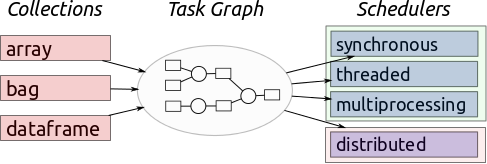
If you already work with numpy arrays on a regular basis, dask is an easy way to make your code break less. Large arrays that in the past caused memory errors, suddenly work. This is really useful with large satellite images I work with. While it always pays to profile your code to find weak spots and write better code - Dask is as close to an easy button that I have found.
Developed in part by folks at the Climate Corporation, more on the project can be found here.
Code Basics##
First, import dask.array.
import dask.array as da
An example tif
example_tif = 'Y:\\Documents\\DATA\\example.tif'
I also import rasterio, as it’s an easy, open source way to interact with rasters.
import rasterio

# IMPORT FUNCTIONS

def geoTiffNumpy(tiffFile):

    with rasterio.open(tiffFile) as r:
        ar = r.read(1)

    return ar
Here is where the magic happens. Open the tif and use da.from_array to daskify it. The chunk size is important, as you want to have around 1 million elements. See the very bottom of this page for more on chunks.
# Turn into numpy, then dask array
example_numpy = da.from_array(geoTiffNumpy(example_tif),
                              chunks=(1000,1000))

# do something to the dask array that would
# normally break your code.

example =  example_numpy * example_numpy

# This is the important part/the cool thing.
# The work isn't actually done until you call this line.

example.compute()
Dask arrays are less flexibile than numpy arrays, so sometimes its helpful to move the data back to numpy arrays, like this.
# when you want to get out of the Dask array do this.
 out = np.array(example)
There is a lot more to both xarray and dask that I am just starting to tap into - but that’s all for now.